To help keep your earbuds performing at their best and extend their service life, please follow the care and usage tips below:
-
We recommend using the earbuds at least once a month. Leaving the earbuds unused for long periods may cause the battery to over-discharge and affect battery life.
-
Avoid waiting until the battery is at 20% or until the earbuds power off due to low battery before charging, as this may affect battery life.
-
Place the earbuds on a dry tabletop. If liquid enters the earbuds by accident, dry them with a hair dryer on the cool setting.
-
Avoid using the earbuds in low-pressure environments.
-
Avoid applying excessive external force, as this may cause irreversible damage to the earbuds.
-
Avoid using the earbuds in humid environments.
Water and Dust Resistance:
The ANKER soundcore AeroClip 2 charging case is not dustproof or water-resistant. Only the earbuds are dustproof and water-resistant, with an IP57 rating. They can be used in dusty environments or for brief immersion in water, but they are not suitable for use while swimming, showering, or other activities involving high water pressure or high-speed water flow. Please avoid using them in these conditions.
Note:
-
Splash resistance, water resistance, and dust resistance are not permanent and may decrease with normal wear.
-
If foreign objects or liquid enter the charging port, carefully clean the area, dry the port with a hair dryer on the cool setting, and leave the earbuds to air-dry for 24 hours. Charge only after the charging port is completely dry.
Cleaning and Maintaining the Charging Contacts:
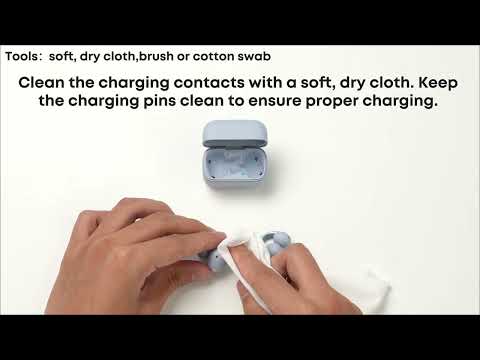
1. Clean especially after exercise. After exercising, wipe sweat from the charging contacts. Placing earbuds with excessive sweat directly into the charging case or allowing dirt to build up on the charging contacts may cause poor contact, preventing the earbuds from powering off or charging properly.
2. Under normal conditions, the charging case indicator light will turn on and then turn off when you place the earbuds in the case. If the light does not turn on, the earbuds may not be making proper contact with the charging case. Gently clean the charging contacts on the earbuds and in the charging case with a cotton swab or a dry cloth lightly dampened with alcohol.
Note: If the earbuds remain connected after being placed in the case or do not charge during use, try cleaning them first by following the steps above.
If the issue persists, please contact our customer support team for further assistance. We'll be happy to help resolve the issue and ensure you have a smooth experience.
Cleaning and Maintaining the Sound Outlet Mesh:
For the best sound quality, we recommend cleaning the sound outlet mesh every three months or whenever you notice a significant decrease in volume. Follow these steps:
1. Gently brush the mesh three to five times with a soft-bristled toothbrush or small brush.
2. Moisten a cotton swab with rubbing alcohol and clean dust or debris stuck on the mesh.
3. If needed, use adhesive tape or reusable putty to dab at the mesh, then lift quickly to remove dust or debris trapped in the mesh holes. Repeat two to three times.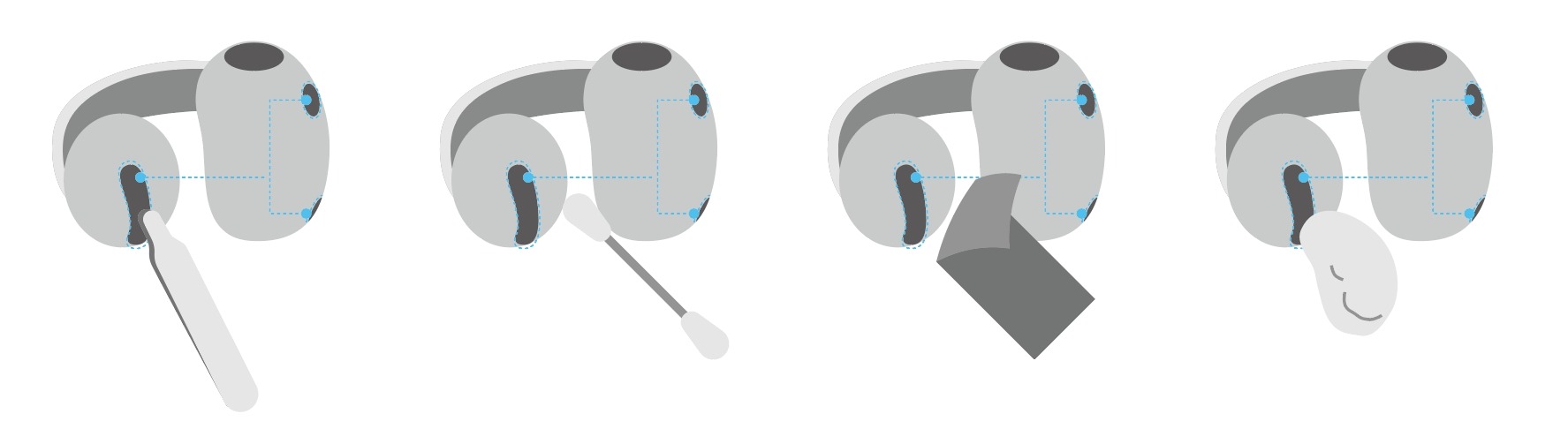
If the issue persists, please contact our customer support team for further assistance. We'll be happy to help resolve the issue and ensure you have a smooth experience.