This article walks you through the basic power operations and first-time setup of your soundcore Space 2 Pro, including turning the headphones on and off, resetting them to factory settings, and adjusting power-related prompts. Follow the sections below to get your headphones up and running.
Turn on: Press and hold the power button for about 2 seconds until the white light flashes, then release it. The headphones will turn on.
Turn off: Press and hold the power button for about 2 seconds. The white light will flash and then turn off, indicating that the headphones are powered off.
How do I reset the headphones to factory settings?
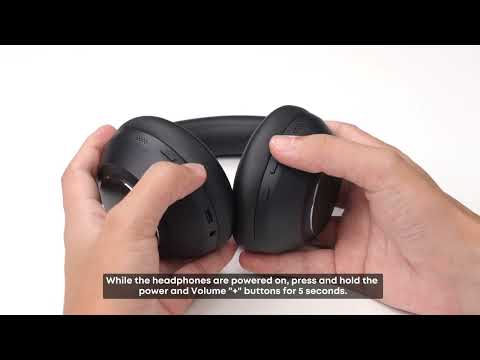
To perform a factory reset, make sure the headphones are powered on. Then press and hold the power button and the volume "+" button at the same time for about 5 seconds. When the red power light slowly flashes 3 times, the factory reset is in progress.
How do I set the auto power-off time?
If the headphones remain disconnected from all devices, they automatically turn off after 5 hours.
You can customize the auto power-off time in the soundcore app by going to Settings > Auto Power Off in the top-right corner. Available options are 30 minutes, 1 hour, 3 hours, 5 hours, or Never.
If you encounter any other issues or your issue has not been resolved, please contact us for further assistance.