Technical Specifications
The battery life figures above are measured results from continuous playback of specified music at 50% volume on an iPhone. If you enable extra features such as 3D Sound or custom EQ in the soundcore app, actual battery life will be shorter than the figures above, which is normal.
How to Check the Serial Number (SN)
You can check the serial number (SN) of your Q31i in either of the following ways. Both SNs are interchangeable—please provide either one when contacting after-sales support. Providing either one will not affect your warranty service.
-
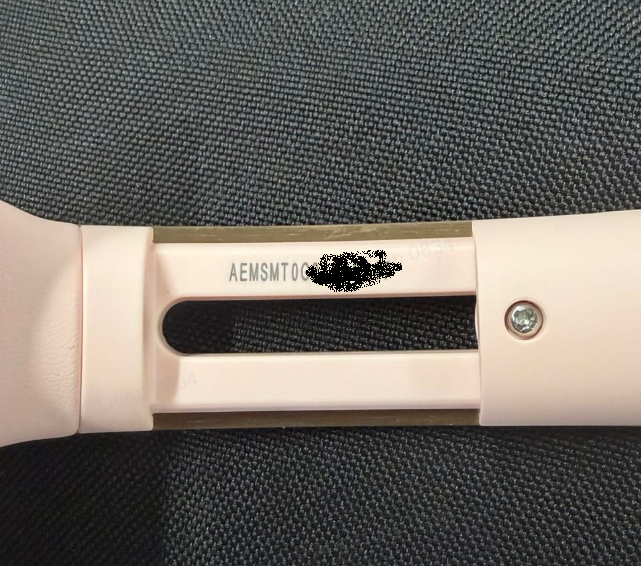
Hardware SN (laser-engraved): Located on the right slider of the headphone, consisting of letters and numbers. As shown in the image below,the SN on the slider is a combination of uppercase letters and numbers, such as "AEMSMT0G216XXXXX".It is mainly used to locate hardware issues.
-
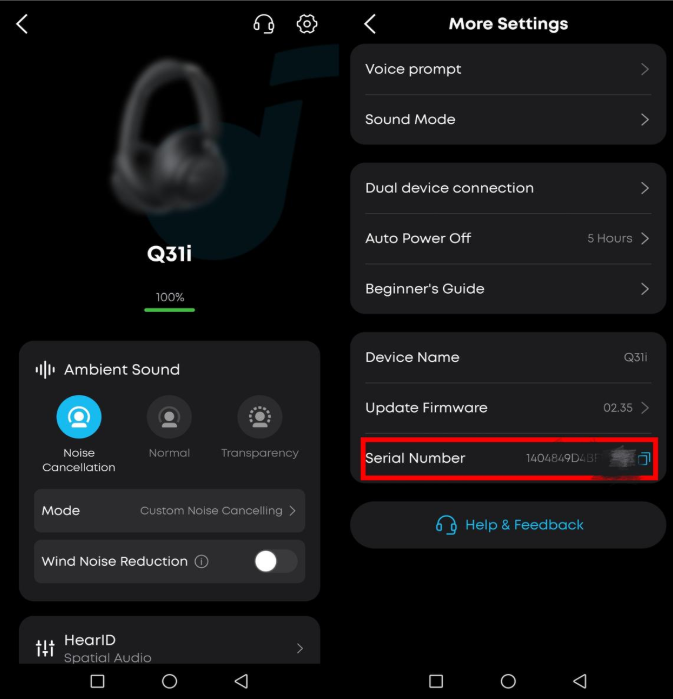
Software SN (in the soundcore app): Open the soundcore app and connect the headphone, go to the device page, then tap "Settings" in the top-right corner to find the SN. It is mainly used for software issues and firmware updates.
If you encounter any other issues or your issue has not been resolved, please contact us for further assistance.


