This guide explains how to make your Q31i connect to only one device, instead of automatically connecting to two devices at the same time.
Why It Connects to Two Devices by Default
The dual-device connection (multipoint) feature is enabled by default. When you power on the headphone, it will automatically try to connect to the two most recently connected devices at the same time. This is convenient if you use the headphone with both a phone and a computer, but it can cause unexpected audio switching or interruptions if you only want to use one device.
Connect to Only One Device
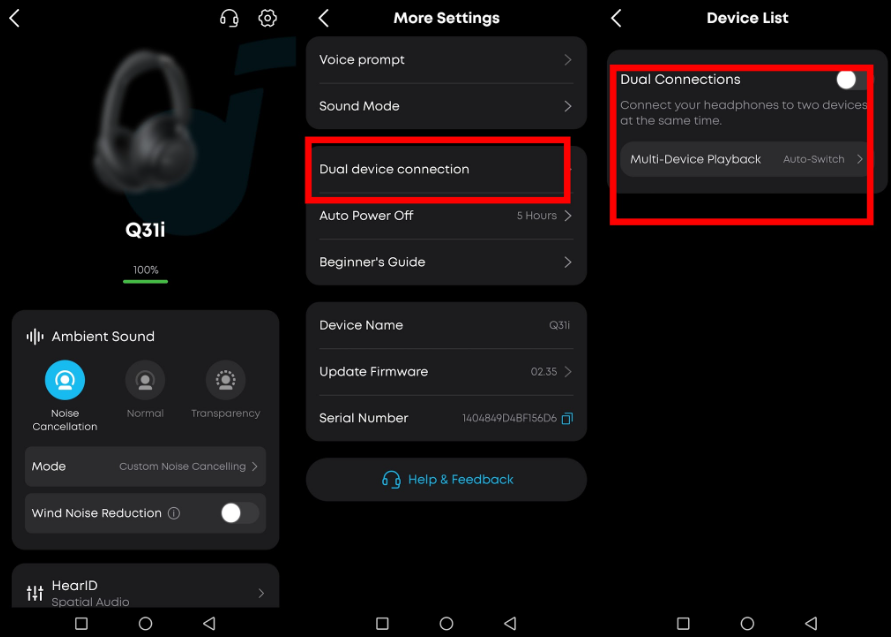
To make the headphone connect to only one device, turn off the dual-device connection feature in the soundcore app:
-
Open the soundcore app and connect the headphone.
-
Go to "Settings" in the top-right corner.
-
Tap "Dual device connection".
-
Turn off the feature.
After that, when you power on the headphone, it will only connect to one device.
Note: If you have previously connected to multiple devices, you can also disconnect or delete the pairing records of other devices on the same "Dual device connection" page.
If you encounter any other issues or your issue has not been resolved, please contact us for further assistance.


