This article walks you through getting a secure and comfortable fit with your earbuds, including sizing tips and what to do if they feel loose or uncomfortable.
Wearing Them for the First Time

1. Check the L / R marks on the back of the earbuds so you're wearing the left and right earbuds correctly.
2. Try a few ear tip and ear wing size combinations to find one that seals well — it's common for one ear to need a slightly different size than the other, since ears aren't perfectly symmetrical.
3. Insert the earbuds and twist gently until they feel secure, rather than just pushing them straight in.
4. Run the Eartip Fit Test in the Anker soundcore app (App > Earbuds Home Page > More Settings > Fit Test) to confirm the seal — this matters beyond comfort, since a good seal is also what lets the noise cancellation and sound quality perform as intended.
If the Earbuds Feel Loose or Fall Out
This is usually a sizing issue. An ear wing or tip that's a size too large can keep the earbud from seating fully in your ear, which is what makes it feel loose or work its way out over time.
1. Try a size down on the ear wing or tip, testing one ear at a time — your left and right ear may end up needing different sizes.
2. Twist the earbud gently into position instead of pushing it straight in; twisting helps it lock into the right angle for your ear.
If They Feel Uncomfortable After Long Wear
1. Recheck your fit using the steps above — even a good seal can start to feel different after extended wear.
2. If you've had them in for a long stretch, take a short break to let your ears rest.

Installing Ear Tips and Removing Ear Wings
-
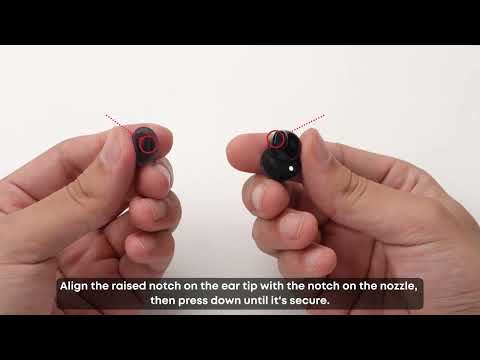
To install an ear tip: the sound nozzle and ear tip are both oval-shaped — align the raised part of the tip with the notch on the nozzle, then push the tip straight on.

-
To remove a size 0 ear wing: hook the edge of the wing with your fingernail, as shown in the image.
-
To remove a size 1 or 2 ear wing: pull the silicone at the top of the wing at a 45° angle, as shown in the image.


If you encounter any other issues or your issue has not been resolved, please contact us for further assistance.