Anker Liberty Buds 2 can stay connected to two devices at the same time, for example your phone and your laptop. This article explains how the earbuds decide which device to play from, how to add a second device, and what to do if you'd rather keep your audio on just one.
How Audio Switches Between Your Two Devices
You don't need to pair again or switch manually when you move between devices. The earbuds follow what you're doing:
-
Music and other audio: The earbuds switch to whichever device played audio most recently. If you're listening on your phone and then start something on your laptop, the sound moves to your laptop.
-
Incoming calls: Calls always take priority. If a call comes in on either device, the earbuds connect to it so you don't miss it.
Because the earbuds play from the most recent audio source, anything that makes a sound on your second device can take over from the first. A common example is listening to music on your phone while working on your computer. When a message or notification sound plays on the computer, the earbuds switch to it and your music pauses. This is how dual-device connection is designed to work on Anker Liberty Buds 2, and it isn't a fault with your earbuds or your devices.
Some video streaming platforms also need you to pause playback manually before the earbuds can switch over to the new audio source.
Tips for a Smoother Experience
-
Mute notification sounds on the device you use less for audio. If your computer is only there for work, turning off its message and system sounds keeps your phone's music from being interrupted.
-
Pause before you switch. If audio doesn't move to the new device, pause playback on the first device and then play on the second.
-
Keep it to one device when you need uninterrupted listening. If you're on a long listen or in an important session and can't risk an interruption, turn off Dual Connections (see below) so the earbuds stay with a single device.
Connecting a Second Device
With the earbuds already connected to one device, use any of these to add another:
-
Press and hold the touch area on both earbuds at the same time for 3 seconds. When you hear the pairing tone, the earbuds are ready to pair with your second device.
-
In the soundcore app, tap the settings icon in the top right corner, go to Device List, then tap Connect New Device.
-
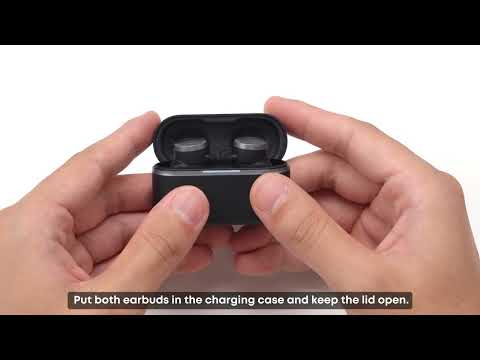
Place the earbuds in the charging case, keep the lid open, and press and hold the case button for 3 seconds.
Then open Bluetooth settings on the second device and select "Anker Liberty Buds 2."
Turning Off Dual-Device Connection
If you'd prefer the earbuds to stay with one device, open the soundcore app and go to Home > Settings > Dual Connections to turn it off.
Switching devices may briefly cut the audio, so you may hear a short pause when you change this setting.
If you encounter any other issues or your issue has not been resolved, please contact us for further assistance.