What should I do if one earbud discharges quickly?
Try the following troubleshooting steps to see if they are helpful:

1) Fully charge both earbuds and use them at the same time. Test how long they can last and let us know the duration (minutes).
2) Test the side with problems separately to see how long it can last with a full charge. Let us know how long the problematic earbud can last (minutes).

To reset the earbuds:
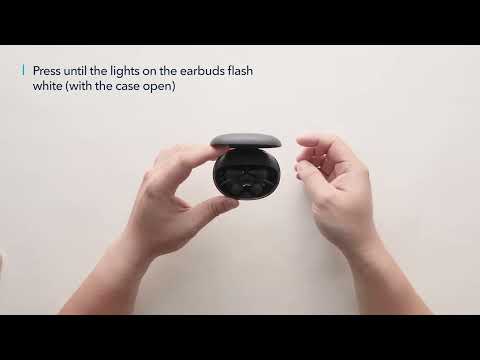
- Place the earbuds into the charging case and leave the cover open.
- Press and hold the button at the bottom of the case for 10 seconds until the LED indicators on the earbuds flash red 3 times and then turn white. Wait until the LED indicator on one earbud flashes fast while the other flashes slowly. This confirms that the reset was successful and your earbuds can be connected normally.

Note: Playtime in Noise Cancellation mode and Transparency mode will drain faster than normal mode. Generally, the earbuds could last around 6-7 hrs at 60% volume when in Normal mode. Please note that playtime varies depending on the volume level and audio content played on the headphones.

If you have additional questions, please contact us at service@soundcore.com for further assistance. Make sure to mention that you have tried the steps in this FAQ so our agents do not ask you to repeat them.
What should I do if one earbud discharges quickly?
22 undefined
Unlock Our New Easy-To-Use Warranty Service
257840 views/368 likes/2025-04-08 16:02:12
soundcore parts and accessories
27743 views/1 likes/2025-04-08 16:00:05
How to Reset Your soundcore Headphones
47475 views/4 likes/2025-04-08 16:03:59
How to Solve Common Issues with True Wireless Earbuds
16090 views/1 likes/2025-04-08 16:15:47
Soundcore Warranty Policy
56209 views/10 likes/2022-10-13 11:05:11
Parts and Accessories of soundcore Headphones
11203 views/1 likes/2025-04-08 16:02:25
How to Identify Genuine soundcore Products
17206 views/2 likes/2025-04-08 16:02:15
How to Clean soundcore Headphones
6473 views/2 likes/2025-04-08 16:02:37
A3930 Liberty 2 Pro Upgraded Version Quick Start Guide
A3930 Liberty 2 Pro Upgraded Version DOC
A3930 Liberty 2 Pro Upgraded Version User Manual
A3931 Life Dot 2 NC Quick Start Guide
A3931 Life Dot 2 NC DOC
A3931 Life Dot 2 NC User Manual
View More
How to Wear the Liberty 2 Pro Upgraded Version Correctly
How to Use HearID for Liberty 2 Upgraded Version
How to Pair Liberty 2 Pro Upgraded Version
How to Reset Liberty 2 Pro Upgraded Version
How to Replace the EarWings and EarTips on Liberty 2 Pro Upgraded Version
How to Power Liberty 2 Pro Upgraded Version On/Off and Use the Controls
View More
Contact Us