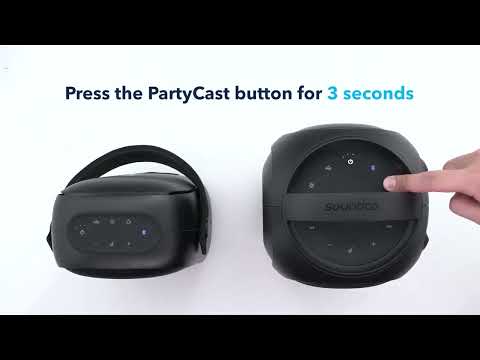
How to Enable PartyCast Mode on Soundcore Trance Go

PartyCast wirelessly synchronizes your music across an almost unlimited number of PartyCast-compatible speakers. 
 

If you are unable to enter PartyCast mode, please try the following:

Enabling PartyCast Mode

  1. Reset the Soundcore Trance Go speakers by holding both Bluetooth and Volume+ buttons for 5-10 seconds. 
  2. Connect the first speaker with your Bluetooth device.
  3. Press and hold the PartyCast button on Soundcore Trance Go for more than 3 seconds. The PartyCast LED indicator will flash white slowly.
  4. Press and hold the PartyCast button for the second speaker to enter PartyCast mode. Once the LED flashes white slowly, double-tap the PartyCast button until the white indicator flashes quickly.
  5. When successfully connected, the PartyCast LED indicator on the primary speaker will continue flashing white, while the LED indicator on the secondary speaker will be a steady white.
  6. Audio from the speakers should play in unison to confirm PartyCast mode has been successfully enabled.

If you have additional questions, please contact us at service@soundcore.com for further assistance.


How to Enable PartyCast Mode on Soundcore Trance Go
27 undefined
Soundcore App Introduction
37225 views/2 likes/2025-04-08 16:00:37
How to reset a soundcore speakers
17948 views/7 likes/2025-04-08 16:00:34
How Do I Connect to the Soundcore App?
21043 views/3 likes/2025-04-08 16:00:47
Soundcore Warranty Policy
54912 views/10 likes/2022-10-13 11:05:11
soundcore speakers failed to connect with my devices
11940 views/1 likes/2025-04-08 15:56:00
How to charge and power on soundcore speakers
12170 views/3 likes/2025-04-08 15:56:00
What if the Speaker is Not Charging?
6041 views/1 likes/2025-04-08 16:00:08
Bluetooth connected but no sound in soundcore speakers
6455 views/1 likes/2025-04-08 15:55:59
How to stop soundcore speaker from buzzing noise
4514 views/1 likes/2025-04-08 16:01:44
EU Declaration of Conformity for soundcore A3i_A3992
A3961 QSG V2(1)
UK&CA Declaration of Conformity for soundcore Liberty 4_A3953
EU Declaration of Conformity for soundcore Liberty 4_A3953
A3947_Liberty 4 NC_QSG
Liberty 4_A3953_QSG
View More
How to use Liberty 4 Wellness features
How to Wear Liberty 4 and Change Eartips
How to Pair and Reset Sport X10
How to solve a connection issue on Sleep A10
How to Connect to the Soundcore App and Update Firmware for Sport X10
How to Use Features On the Soundcore App for Sport X10
View More
Contact Us