Why is there no sound when using AUX on Motion X600?
The soundcore Motion X600 speaker supports both Bluetooth mode and AUX mode.
Please note that Motion X600 is compatible with 3-pin AUX cables. If the AUX cable does not have 3 pins, there may not be any sound output.
Please refer to the attached image for the correct AUX cable for Motion X600:
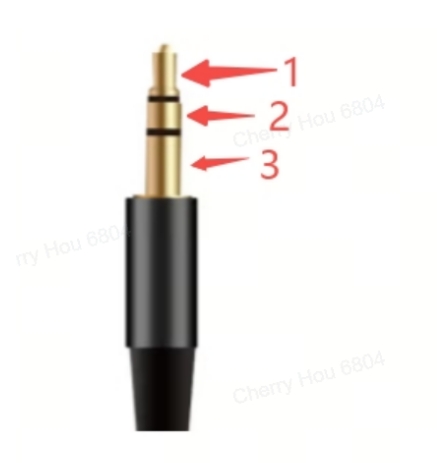
If you have any additional questions, please contact us at service@soundcore.com for further assistance.


16 undefined
Soundcore Motion X600 A3130 FAQ


Payments & Vouchers FAQ
How to Register Your E-Warranty Card in the Soundcore App
Guide to Locating the Serial Number (SN) of Your soundcore Speakers
How to turn off the power on/off and bluetooth connection sound?
What should I do if sound is interrupted or there's no sound when playing through AUX?
Why won't Motion X600 turn on?
How can I enable LDAC on Motion X600 in TWS mode?
Unlock Our New Easy-To-Use Warranty Service
How Do I Customize the EQ for My Motion X600 Speaker?

【A3130】soundcore Motion X600 EU Declaration
soundcore Motion X600 User Guide (A3130)
soundcore Motion X600 Ръководство за потребителя (A3130)
soundcore Motion X600 Korisničko uputstvo (A3130)
soundcore Motion X600 Kasutusjuhend (A3130)
soundcore Motion X600 Korisnički vodič (A3130)
View More


How to Enable True Wireless Stereo
How to Connect Using LDAC


