Touch controls for Liberty 3 Pro
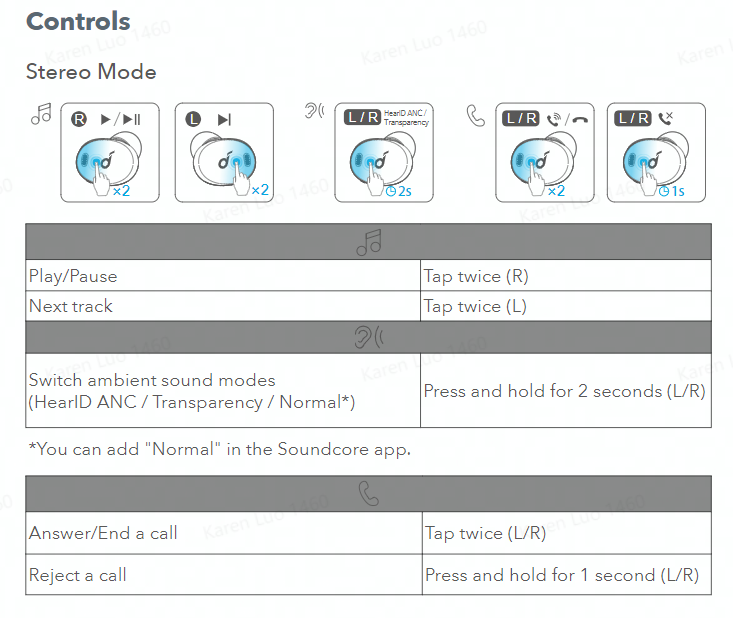
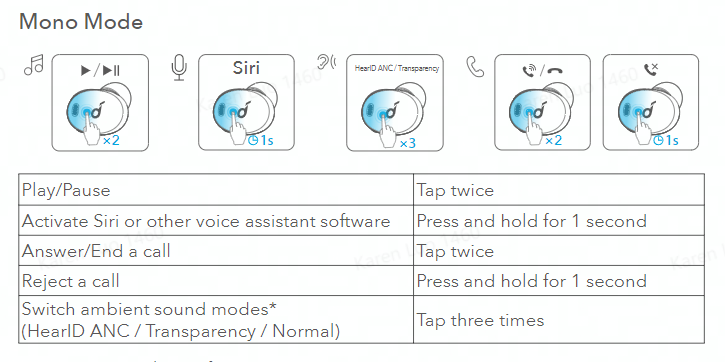
Usually, you can find the touch controls for Liberty 3 Pro on the user manual. But for your reference, we will list the controls for Liberty 3 Pro below:

- You can enable this function in the Soundcore app.
- All of the controls in stereo and mono modes can be customized in the Soundcore app.
- Adjust the volume level via the connected device or in the Soundcore app.
- In stereo mode, noise cancellation mode is set by default. Each time you power on and connect, or switch to the stereo mode from mono mode, your earbuds will restore the last setting.
42 undefined
Unlock Our New Easy-To-Use Warranty Service 273631 views 480 likes/2025-04-08 16:02:12
soundcore parts and accessories 34391 views 1 likes/2025-04-08 16:00:05
How to Reset Your soundcore Headphones 59177 views 6 likes/2025-04-08 16:03:59
Guide to Locating the Serial Number (SN) of Your soundcore Headphones 58419 views 7 likes/2024-08-16 18:04:10
How to Solve Common Issues with True Wireless Earbuds 22578 views 1 likes/2025-04-08 16:15:47
Parts and Accessories of soundcore Headphones 14337 views 1 likes/2025-04-08 16:02:25
How to Identify Genuine soundcore Products 22534 views 2 likes/2025-04-08 16:02:15
What should I do if Liberty 3 Pro cannot pair or reconnect with my device? 4112 views 1 likes/2025-04-08 17:34:03
How do I enable Multipoint connection on Liberty 3 Pro? 2828 views 1 likes/2025-04-08 16:01:30
How to Clean soundcore Headphones 8884 views 2 likes/2025-04-08 16:02:37

Liberty Air 2 Pro A3951 User Manual

A3951 Liberty Air 2 Pro DOC

A3952 Liberty 3 Pro Quick Start Guide

A3952 Liberty 3 Pro DOC

A3952 Liberty 3 Pro User manual

Liberty 4_A3953_QSG
View More


Liberty Air 2 Pro - Escape Into Pure Sound


How To Use Soundcore Liberty Air 2 Pro


How to Power Liberty Air 2 Pro and Use the Controls


How to Use HearID and Custom EQ of Liberty Air 2 Pro


How to Update Liberty Air 2 Pro’s Firmware


How to Switch Between Modes in the Soundcore App for Liberty Air 2 Pro A3951
View More