To ensure the best visual and functional performance with the Nebula X1/ X1S/ X1 Pro projector, follow these guidelines for optimal setup based on ambient light conditions and placement distance.
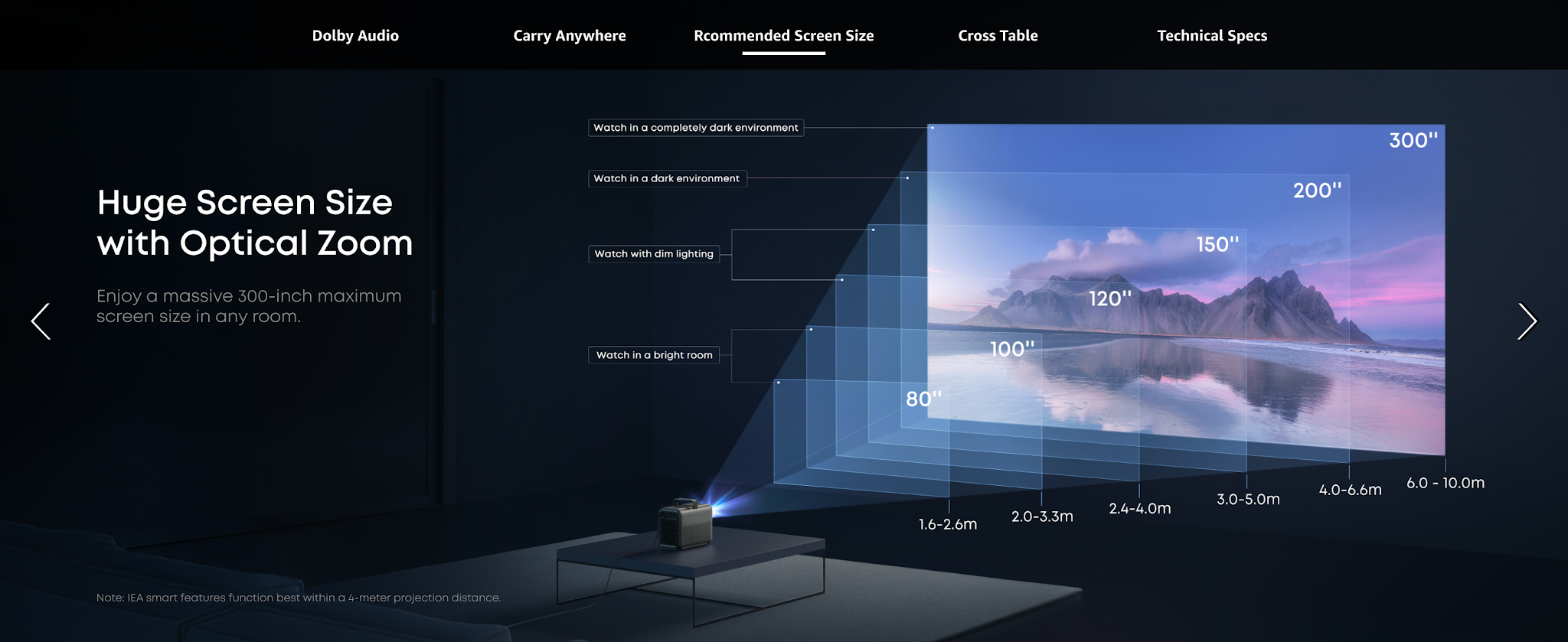
Adjust the placement distance and screen size based on ambient light brightness
Adjust the placement distance based on intelligent function restrictions
The Nebula Nebula X1/ X1S/ X1 Pro is engineered to deliver flawless performance within a recommended placement distance of 1.2–4 meters. Operating outside this range can compromise safety, functionality, and image quality:
-
At ≥3 meters: Eye Guard is Disabled
Beyond 3 meters, the projector’s automatic eye guard system (which automatically reduces brightness when human eyes are detected) may deactivate.
-
Beyond 4 meters: Smart Features Become Unstable
-
Autofocus & Keystone Correction: Reduced sensor accuracy may lead to blurred or distorted images.
-
Obstacle Avoidance: The projector may fail to detect nearby objects, risking physical obstruction of the projected area.
-
Screen fit & Spatial Adaptation & Spatial Recall: The system may misjudge room dimensions, causing misalignment or uneven brightness distribution.
-
Visual Quality Trade-offs: Larger screen sizes beyond 4 meters require higher brightness to combat ambient light.
If the above solutions cannot solve your issue, please contact Nebula Customer Support at support@seenebula.com for further assistance.