How are Liberty 5 Pro Max charging case recordings stored, and how do I avoid losing my recording data?
1. How Recording Files Are Stored and Transferred
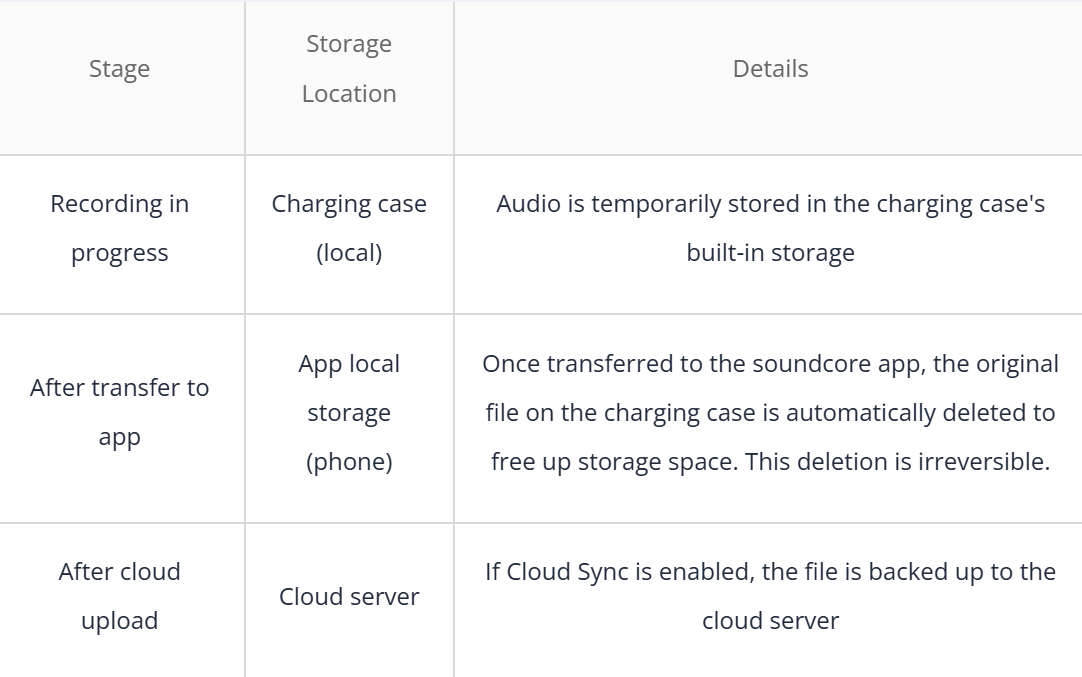
When you record using the charging case, your files move through the following stages:
Note: By default, recordings are stored locally on your soundcore app only. If Cloud Sync is not enabled, files will not be automatically backed up.
2. How to Transfer Recordings to Your Phone:
a. iOS devices
Live transfer: Connect the charging case to the app. When you start recording, the soundcore app will launch automatically, enabling real-time recording and transfer.
Local recording upload: Connect the charging case to the app and enter the AI Notes feature. Local recordings will automatically start transferring to your phone.
b. Android devices
Live transfer: Android users must manually open the soundcore app before recording to enable live transfer. When you open the app, it will automatically connect to your previously paired device.
Local recording upload: Connect the charging case to the app and enter the AI Notes feature. Local recordings will automatically start transferring to your phone.
Transfer speed: Approximately 2 minutes per 1 hour of audio. Transfer speed may be affected by Bluetooth connection quality.
Note: Once recordings are transferred to the app, the original files on the charging case will be automatically deleted. Recordings stored in the app are saved soundcore app only — uninstalling the app will result in permanent data loss. We recommend enabling Cloud Sync as a backup.
3. Actions That Will Cause Permanent Data Loss
The following actions will permanently delete your recordings and they cannot be recovered:
Uninstalling the app — Uninstalling the soundcore app clears all local app data, including all transferred recordings.
Clearing app data — Clearing app data in your phone's settings has the same effect as deleting all recordings.
Factory resetting your phone — This wipes all apps and their associated data.
Switching to a new phone — To transfer local recordings from your old phone to a new one, you must first upload them to the cloud.
Important: Before uninstalling the app, please make sure you have backed up any important recordings to the cloud or exported them to another location. Uninstalling the app will permanently delete all locally stored recordings and they cannot be recovered.
4. How to Protect Your Recording Data
a. Enable Cloud Sync
Open the soundcore app and enable Cloud Sync.
Confirm that recordings have been successfully uploaded before performing any other operations.
Periodically check the cloud backup status to ensure files are up to date.
b. Manual Backup
Export important recordings from the app to your phone's local storage (e.g., a dedicated folder in the file manager).
You can also transfer files to a computer or upload them to a personal cloud service as an additional backup.
If you encounter any other issues or your issue has not been resolved, please contact us for further assistance.