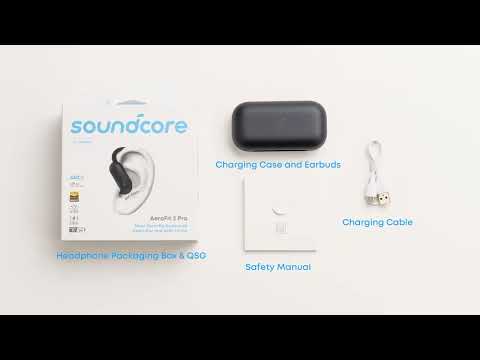
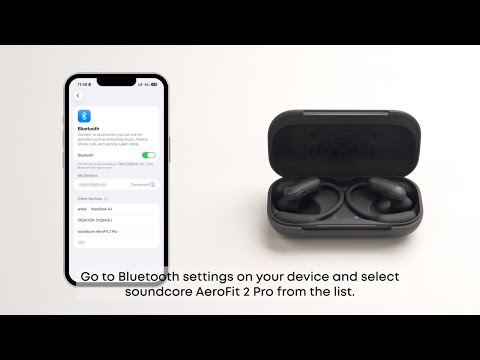
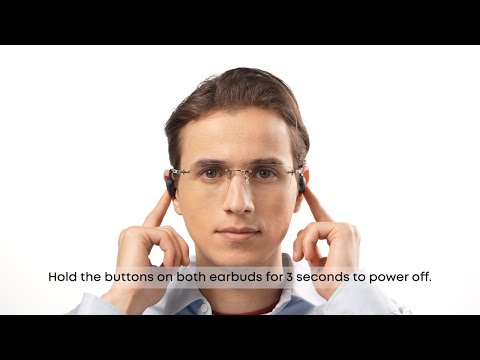
We have made a list of soundcore AeroFit 2 Pro frequently asked questions from our valued customers. This FAQ includes links to articles where you can find more information.
1. What is the Bluetooth version of soundcore AeroFit 2 Pro?
Bluetooth 6.1.
2.What audio codecs do soundcore AeroFit 2 Pro support?
SBC, AAC, and LDAC.
3.What is the battery capacity of soundcore AeroFit 2 Pro and how long does it take to charge them?
60mAh for each earbud. A full charge takes about 1 hour.
4.What is the battery capacity of soundcore AeroFit 2 Pro's charging case and how long does it take to charge it?
750mAh. A full charge takes about 2 hours.
5.What is the waterproof/dustproof rating for soundcore AeroFit 2 Pro?
Earbuds: IP55
Charging Case: Not water resistant.
6.What is the wireless charging protocol for soundcore AeroFit 2 Pro's charging case?
Wireless charging supports the Qi protocol with a maximum power output of 3W.
7.What should I do if the AI translation feature is unavailable on my soundcore AeroFit 2 Pro?
-If the AI translation feature is not displayed within the app, please uninstall the current version and download the latest version of the soundcore app from the App Store. Ensure the app version is 3. 8. 7 or higher.
-If an error occurs on the AI translation server or network issues arise, please restart the soundcore app and try again.
8.How many times can I charge soundcore AeroFit 2 Pro to a full charge using the charging case?
The earbuds can be fully recharged a total of 3 times with a fully charged charging case.
9.What is the battery life of soundcore AeroFit 2 Pro, and how long can they last with the charging case?
With music playback time at 50% volume:
Open-Ear Form: Approximately 7 hours, extending to 34 hours with the charging case.
ANC Form: Approximately 5 hours, extending to 24 hours with the charging case.
10.What is the battery life of soundcore AeroFit 2 Pro earbuds when LDAC is enabled?
With music playback time at 50% volume,
Open-Ear Form: Approximately 6 hours.
ANC Form: Approximately 3 hours.
11.What is the battery life of soundcore AeroFit 2 Pro during calls?
With calls at 60% volume,
Open-Ear Form: Approximately 4 hours
ANC Form: Approximately 4 hours
12.How many Bluetooth devices can soundcore AeroFit 2 Pro remember?
Up to 8 Bluetooth devices.
13.Does soundcore AeroFit 2 Pro's charging case support wireless charging?
Yes, the charging case supports wireless charging.
14.How long does it take to fully charge soundcore AeroFit 2 Pro with wireless charging?
When using wireless charging, they take approximately 4 hours to fully charge.
15.Do soundcore AeroFit 2 Pro feature wearing detection?
No, soundcore AeroFit 2 Pro does not feature wearing detection.
16.Do soundcore AeroFit 2 Pro support fast charging?
Yes, they support fast charging, providing up to 3.5 hours of playback with just a 10-minute recharge.
Please note that the charging case does not support this feature.
17.What is the maximum sound pressure of soundcore AeroFit 2 Pro?
Open-Ear Form: 92 dB
ANC Form: 93 dB
18.What is the Bluetooth range of soundcore AeroFit 2 Pro?
33 ft / 10 m.
19.Do soundcore AeroFit 2 Pro provide power-on and low battery voice prompts?
Yes, the earbuds provide a voice prompt when they power on and when the battery drops to around 10%, repeating every 15 minutes.
20.Are soundcore AeroFit 2 Pro suitable for use while diving or swimming?
No.
21.How do I enable Dual Connections on soundcore AeroFit 2 Pro?
There are two methods to enable Dual Connections and connect your earbuds with a second device.
-1. In the soundcore app, enable "Dual Connections" on the home page.
-2. When the earbuds are connected to a device, place them in the charging case with the lid open. Press and hold the charging case button for 3 seconds. The charging case indicator light will flash slowly, indicating pairing mode.
Note: If your earbuds are already connected to two devices, remove at least one device first.
22.When Dual Connections is enabled on soundcore AeroFit 2 Pro, what should I do if there is no sound after switching to another device?
-1. Ensure the other device has paused music playback and is not using the audio channel.
-2. Switching between devices may take around 20 seconds due to potential compatibility issues.
23.How do I turn off touch controls on soundcore AeroFit 2 Pro?
This feature is not supported.
24.How do I reset soundcore AeroFit 2 Pro?
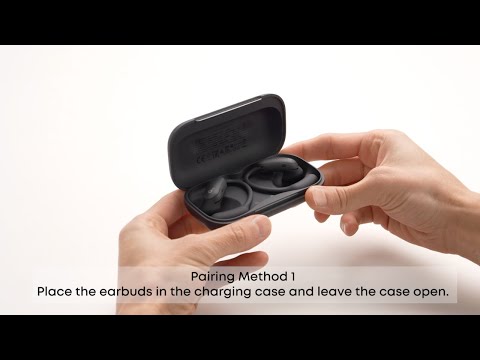
Place the earbuds into the charging case and leave the case open. Hold the button on the case for more than 10 seconds. After 3 seconds, the case indicator light will start flashing white. After 10 seconds, the case indicator light will quickly flash white three times, indicating a successful reset.
25.How do I force soundcore AeroFit 2 Pro into pairing mode?
Place both earbuds back into the charging case with the lid open. Hold the charging case button for 3 seconds. The charging case indicator light will flash white, and the earbuds will disconnect from their current connection and enter pairing mode.
26.Does soundcore AeroFit 2 Pro support single-ear use?
Single-ear use is supported, but functions such as dual-ear pairing, resetting, and custom EQ cannot be performed.
27.How do I pair the left and right earbuds of soundcore AeroFit 2 Pro with different devices?
This feature is not supported.
28.What should I do if my soundcore AeroFit 2 Pro gets warm while charging?
- Stop charging and check if there is any moisture or sweat in the charging port of the charging case.
- Clean the charging port before attempting to charge again.
29.How can I better maintain and care for my soundcore AeroFit 2 Pro?
-1. Use the earbuds at least once a month; avoid leaving them unused for a long time. The battery life can be significantly affected if the earbuds are left completely discharged.
-2. Avoid using the earbuds until the battery drops to 20%, or until they power off due to low battery. This can also greatly impact battery life.
-3. Do not leave the charging case with low battery for extended periods; charge it regularly.
-4. Clean the charging pins promptly after use.
-5. Store the earbuds in a dry place. If they accidentally come into contact with liquid, dry them with a hairdryer on the cool setting.
30.What should I do if one of soundcore AeroFit 2 Pro earbuds fails to power on or pair?
Reset the earbuds by following these instructions:
Place the earbuds in the charging case and leave the lid open. Hold the button on the case for more than 10 seconds. After 3 seconds, the case indicator light will start flashing white. After 10 seconds, the case indicator light will quickly flash white three times, indicating a successful reset.
31.What is the latency of soundcore AeroFit 2 Pro?
Approximately 200 ms.
32.What do I need to use to charge soundcore AeroFit 2 Pro's charging case?
To charge the charging case, a certified charger and charging cable rated at 5V/1A or higher are required.
33.What should I do if my soundcore AeroFit 2 Pro cannot be powered on?
Charge the charging case for at least one hour and place the earbuds into the case to recharge them.
34.What should I do my soundcore AeroFit 2 Pro won't pair with my phone?
Reset the earbuds by following these instructions:
Place the earbuds in the charging case and leave the lid open. Hold the button on the case for more than 10 seconds. After 3 seconds, the case indicator light will start flashing white. After 10 seconds, the case indicator light will quickly flash white three times, indicating a successful reset.
If you encounter any other issues or your issue has not been resolved, please contact us for further assistance.