How to Connect PowerConf with a Mobile Device?
Follow the steps given below to pair the PowerConf to your smartphone, tablet, or other mobile devices:
- Turn on the Bluetooth setting on your mobile device.
- To enter pairing mode, press and hold the Bluetooth button on the speakerphone for 2 seconds.
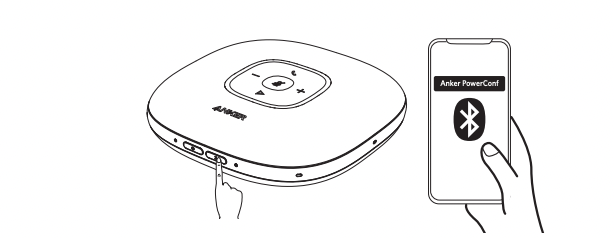
- To pair, go to the Bluetooth menu on your mobile device and select the PowerConf from the list of available devices.
If you have additional questions, please contact us for further assistance.


20 undefined
The 4 Easiest Ways to Make Your Speakerphones Last a Lifetime


How do I Force Shutdown PowerConf S500?
AnkerWork Warranty Policy
PowerConf S500 A3305 FAQ
PowerConf A3301 FAQ
Get the most out of your Anker PowerConf S500 speakerphone (A3305)
What settings can be controlled on the AnkerWork app?
How do I upgrade firmware?

AnkerWork PowerConf S3 User Guide (A3302)
AnkerWork PowerConf User Guide (A3301)
PowerConf S500 User Guide (A3305)
PowerConf S500 取扱説明書 (A3305)
PowerConf S500 Benutzerhandbuch (A3305)
PowerConf S3 Guide de l'utilisateur (A3302)
View More

Anker PowerConf: How To Use

How to Use Anker PowerConf S500


