How do I check the battery level?
Thank you for supporting our product.
To check the battery level:
1.Short‑press the power button once (do not hold it down).
2.The battery icon will appear on the display.
-
Red icon: Battery level is below 30% – charge before the next use.
-
Normal icon: Sufficient charge remaining for operation.
If you have any other questions, please don't hesitate to contact Nebula Customer Support at service@soundcore.com for further assistance.


23 undefined
Our 200” Inflatable Screen — True Outdoor Cinema Experience


Dimensions of the 200-inch screen
Screen Cleaning Guidelines
What should I do if the air pump won’t turn on?
How do I check the battery level?
Dimensions of the 120-inch screen
How do I charge the air pump?
How do I mount the Nebula X1 Pro speakers on the screen?
How do I repair a tear in the inflatable frame?
Why is the connection between the screen air valve and the hose adapter so tight?

16.7 ft Silent Inflatable Theater Screen User Guide (D0120)
16.7 ft Silent Inflatable Theater Screen Benutzerhandbuch (D0120)
16.7 ft Silent Inflatable Theater Screen Guía del Usuario (D0120)
16.7 ft Silent Inflatable Theater Screen Guide de l'utilisateur (D0120)
16.7 ft Silent Inflatable Theater Screen 用户指南 (D0120)
16.7 ft Silent Inflatable Theater Screen Uživatelská Příručka (D0120)
View More


Important Safety Instructions for the Inflatable Screen
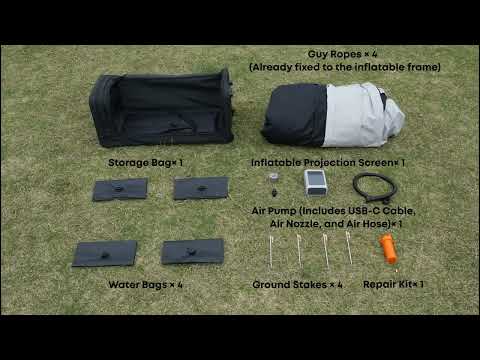
How to Unbox the Inflatable Screen
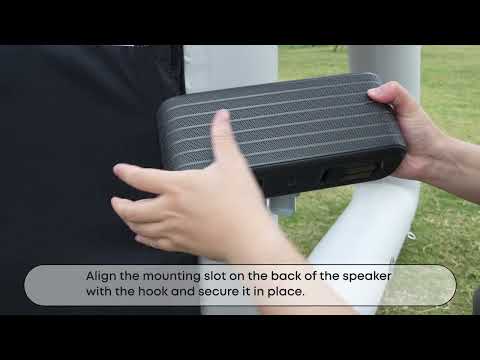
How to Mount the Nebula X1 Pro Front Surround Speaker
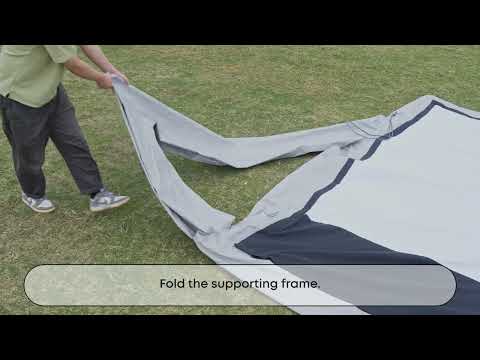
How to Deflate and Store the Inflatable Screen
Important Safety Instructions for the Inflatable Screen
How to Unbox the Inflatable Screen
View More


