How do I check the remaining charge of my charging case?

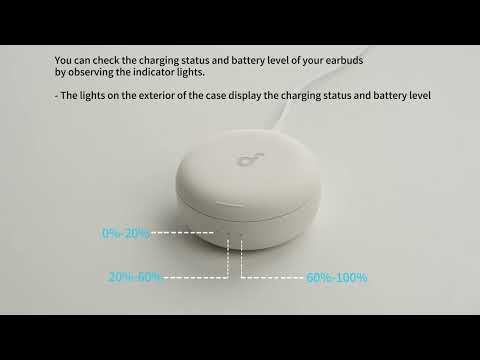
Open the charging case and check the indicator lights on the exterior to view battery level.

0–20% charge: One light stays on for 5s.

20–60% charge: Two lights stay on for 5s.

60–100% charge: All three lights stay on for 5s.


Note: When the charging case's power drops to 0-5%, it will not be able to charge the earbuds. When all lights do not turn on, that indicates the case is fully out of power and needs to be recharged.


If you have any more issues or your issue has not been resolved, please contact us for further assistance.

Unresolved icon
20 undefined
Download icon
【D1301】【soundcore Sleep A30】EU Declaration
Download icon
soundcore Sleep A30 Przewodnik Użytkownika (D1301)
Download icon
soundcore Sleep A30 Guide de l'utilisateur (D1301)
Download icon
soundcore Sleep A30 Benutzerhandbuch (D1301)
Download icon
soundcore Sleep A30 Guía del Usuario (D1301)
Download icon
soundcore Sleep A30 Brukerhåndbok (D1301)
View More
Play video
Sleep A30's Indicator Lights
Play video
Audio Options for Sleep A30
Play video
Connecting with Bluetooth
Play video
Deep Cleaning Your Earbuds
Play video
Setting Audio Timer
Play video
What are the two audio modes and how do I use them?
View More
Contact Us