When wearing the headphones for the first time, follow these steps for the best fit and performance:
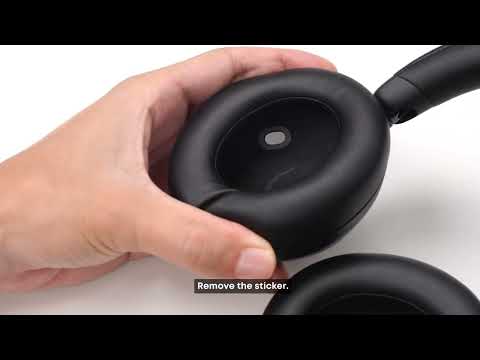
1. Remove the Protective Film
Remove the protective film from the sensor lens inside the left ear cup before first use. Leaving it in place may affect features such as Wear Detection.
2. Check the Left and Right Sides
The sliding arms are marked "L" and "R." Make sure each ear cup is worn on the correct side. Wearing the headphones backward may feel uncomfortable and may affect microphone pickup and call quality.
3. Adjust the Headband
Adjust the headband until the headphones sit comfortably and the ear cups fully cover your ears without obvious gaps.
-
Why does a new product have a smell when I open the box?
New headphones may have a slight material or packaging odor when first removed from the box. This can come from the ear cushion, headband, packaging, adhesives, or other materials that have been enclosed during storage and shipping.
The odor should gradually fade after the headphones are left in a well-ventilated area.
If the smell is unusually strong, persists for an extended period, or is accompanied by visible damage or other abnormalities, stop using the headphones and contact soundcore support.
If you encounter any other issues or your issue has not been resolved, please contact us for further assistance.