Low volume often comes down to a setting on the connected device rather than the earbuds, and the right fix depends on whether you're connected to a computer, Android phone, or iPhone.
On a Computer
1. Reset the earbuds first — place them in the case, hold the case button for 10 seconds until the light flashes 3 times, then pair again. This clears out any stale connection settings that can quietly cap the volume.
2. Turn up the volume on both the computer and whatever app you're playing audio through — many apps have their own internal volume control separate from the system volume.
On an Android Phone
-
On some Android phones, the "Sync Bluetooth Device Volume with Phone" option is turned off by default. Go to Settings > Bluetooth, find your connected earbuds, tap the settings icon next to them, and enable "Sync Bluetooth Device Volume with Phone." If this option isn't visible, you may need to enable Developer Options first: go to Settings > About phone, tap "Build number" seven times to enable Developer Options, then go to Developer Options to check whether this feature is available. The exact path may vary by phone model. In Developer options, turn on "Absolute Volume," or in Bluetooth settings, sync the device's volume with your phone — without this, the earbuds and phone can end up tracking volume separately.
-
Reset and re-pair the earbuds:
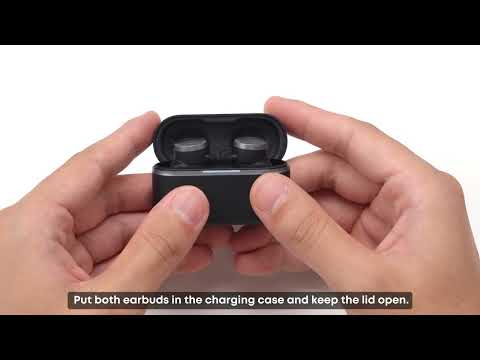
Place the earbuds in the charging case and keep the case open.
Press and hold the case button for 10 seconds, until the red breathing light on the charging case quickly flashes 3 times. This confirms the reset was successful.
-
Check whether "Maximum Volume Limit" is enabled in the soundcore app (Hearing Health > Settings > Volume Limit, app version 5.0.20+) — this feature intentionally caps volume as a hearing-protection measure, so it's worth ruling out if things feel quieter than expected.
On an iPhone
-
Go to Settings > Sounds & Haptics > Headphone Safety and turn off Reduce Loud Sounds — this is iOS's own volume limiter and a common reason volume feels capped.
-
Reset and re-pair the earbuds as described above.
-
Check the Maximum Volume Limit setting in the soundcore app as well, since both the phone and the app can apply a limit independently.
If One Earbud Is Quieter Than the Other
-
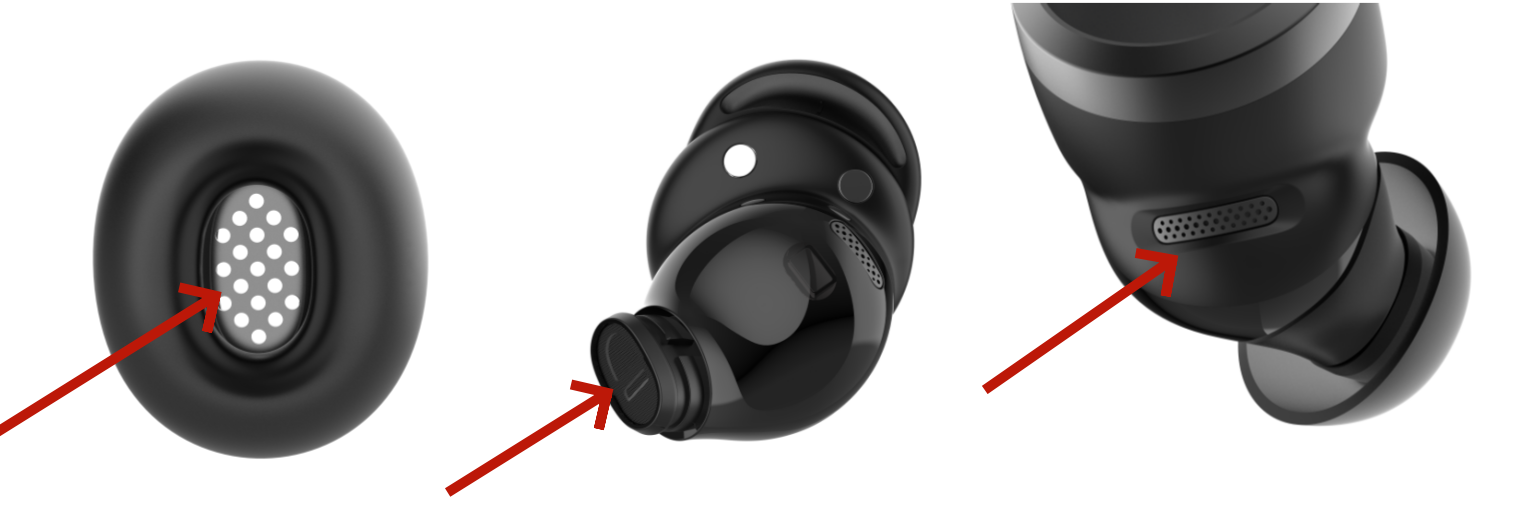
Clean the ear tip mesh, sound nozzle mesh, and rear cavity vent with a cotton swab lightly dampened with rubbing alcohol — a partially blocked mesh muffles sound on just that side.
-
Restart the earbuds by placing them in the case and taking them back out.
-
If the difference remains, check the audio balance setting on your device — it can get shifted without you noticing and will make one side sound quieter regardless of the earbuds themselves.
-
Android: Settings > Accessibility > Audio and On-Screen Text > Audio > Balance.
-
iPhone: Settings > Accessibility > Audio & Visual > Audio Balance.
-
Samsung: Settings > Accessibility > Hearing Enhancements > Connected Audio.
Note: Moving the balance to the left makes the left earbud louder and the right earbud quieter. Moving it to the right has the opposite effect.
If you encounter any other issues or your issue has not been resolved, please contact us for further assistance.