To activate the machine, users have to turn on the main power switch first, then press the start button on the top or on the remote.
If your RoboVac can be charged normally (showing solid blue light when fully charged) but does not start up at all when you press the start/pause button, you can check the following:

1. Make sure the main power switch (on the bottom of RoboVac) is turned on (in the "I" position). Please see the pictures below. It’s different from the start/pause button on the top. “I” stands for “on”, while “O” stands for “off”.

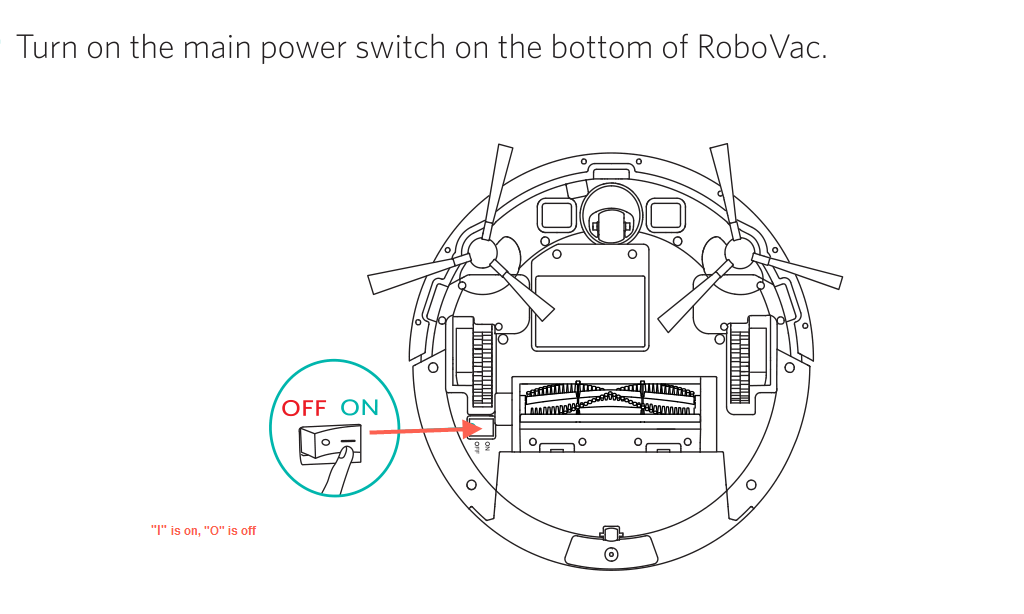
2. When toggling the switch button to the “I” position, you will hear a starting alert. If not, maybe the switch is stuck by dust. You can flip it off and on a few more times, and at the same time, tap the vacuum (vacuum bottom to the floor) to dislodge any dust that might go into the switch.
You can also refer to this video: Troubleshooting if RoboVac Cannot Power On
If the above tips do not help, please email eufy support with a video depicting what happens when you toggle the main power switch to both sides for further assistance.


