There are multiple methods to power your eufy Floodlight Cam, please refer to the following methods based on different Floodlight Cam models.
Floodlight Cam 1080p/2K/E 2K
1. Power adapter
Connect your eufy Floodlight Cam using its power adapter and set up the device on the eufySecurity app first.

2. Junction box
To avoid risks of injury, It is extremely important to shut off the circuit breaker to the location where your eufy Floodlight Cam will be installed before connecting the Floodlight Cam to the junction box.
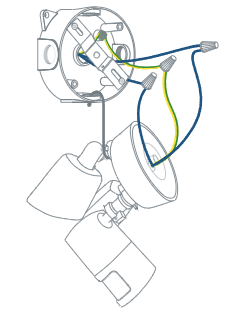
For detailed step-by-step instructions on how to install your eufy Floodlight Cam, please visit How to Install eufy Security Floodlight Camera.
Floodlight Cam 2 Pro
1. USB cable
Connect your eufy Floodlight Cam 2 Pro using the provided micro USB charging cable and a 5V/1A power adapter (not provided) and set up the device on the eufySecurity app first.

Note: Please note Floodlight Cam 2 Pro’s lights will not turn on when the camera is powered on via micro USB charging cable and power adapter.
2. Junction box
To avoid risks of injury, It is extremely important to shut off the circuit breaker to the location where your eufy Floodlight Cam 2 Pro will be installed before connecting the Floodlight Cam 2 Pro to the junction box.
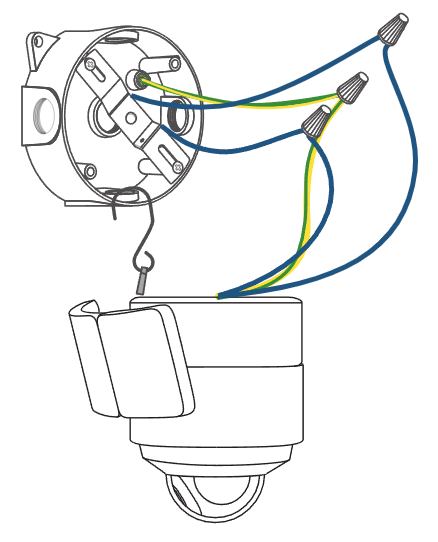
For detailed step-by-step instructions on how to install your eufy Floodlight Cam 2 Pro, please visit How To Install eufy Floodlight Cam 2 Pro.
If you have further questions regarding methods to power eufy Floodlight Cam, please contact us for assistance.


