How to move some of the existing devices to a new Home in the eufySecurity app v4.0?
There are 2 methods to move some of the existing devices to a new Home in the
eufySecurity app v4.0.
1. Create a new Home and then move the existing devices from the existing Home to the new Home.
- Tap “Manage Home” > Add New Home > Name the new Home
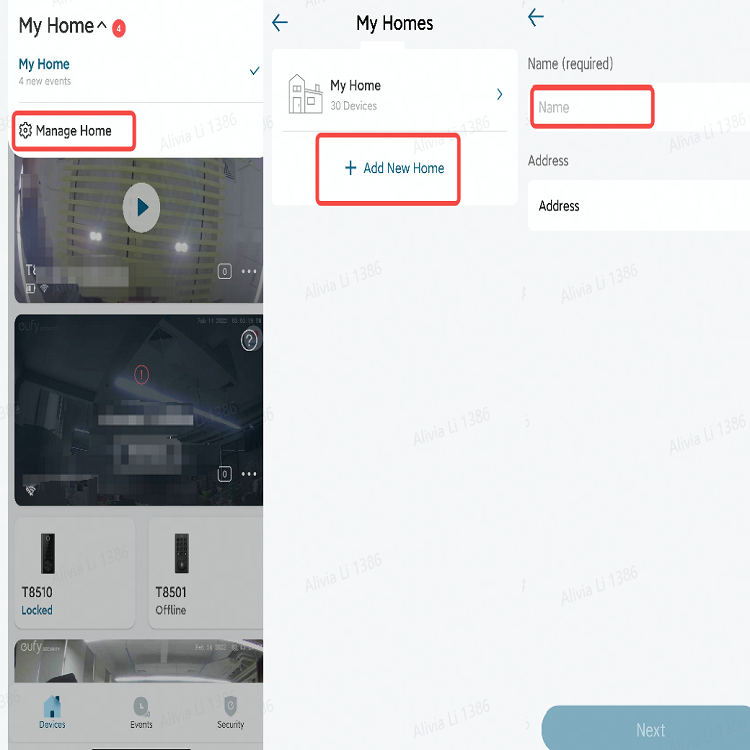
- Tap the existing Home > All Devices > “⇆” icon > choose the new Home

2. Move the existing devices from the existing Home to the new Home directly.
- Tap the existing Home > All Devices > “⇆” icon > Add New Home > Name the new Home > choose the new Home


How to move some of the existing devices to a new Home in the eufySecurity app v4.0?


0 undefined
EU Declaration of Conformity for soundcore A3i_A3992
A3961 QSG V2(1)
UK&CA Declaration of Conformity for soundcore Liberty 4_A3953
EU Declaration of Conformity for soundcore Liberty 4_A3953
A3947_Liberty 4 NC_QSG
Liberty 4_A3953_QSG
View More


How to use Liberty 4 Wellness features

How to Wear Liberty 4 and Change Eartips

How to Pair and Reset Sport X10

How to solve a connection issue on Sleep A10

How to Connect to the Soundcore App and Update Firmware for Sport X10

How to Use Features On the Soundcore App for Sport X10
View More


