If your home has an existing doorbell, you will have the transformer somewhere in your house. It is usually located in the attic, basement or electric panel.
The doorbell transformer has two parameters. The output voltage (eg. 16V)and the output power (eg. 10VA). The eufy wired doorbell requires 16-24VAC, 30VA or above voltage. Most original doorbell systems require limited power, thus the existing transformer might not provide sufficient power to eufy wired doorbells. In such conditions, please upgrade the transformer.
Warning:
- If you’re not comfortable handling the wiring, please hire a licensed electrician.
- Always turn off the main power and make sure the electricity is off before replacing the transformer.
Here are details to upgrade the doorbell transformer:
1. Make sure you shut down the main power in the house before working on electricity.
2. Identify the wires by color. The Ground wire is in green or green and yellow. The Neutral wire is in white or light gray. The Live is in black.
3. Replace the existing transformer with the new one. Connect the output wires to the new transformer. Since the output power is alternating current, it doesn’t matter which wire connects to which terminal.
For how to connect your eufy wired doorbell with a transformer and chime, please click it here.
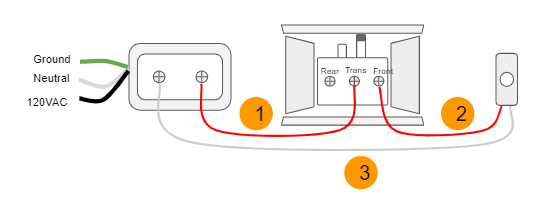
Note: If your doorbell wiring or chime wiring is significantly different than the above diagrams, please alway find 3 wires:
1. The wire from the transformer to the Trans terminal on the chime.
2. The wire from the Front/Rear terminal on the chime to the doorbell button.
3. The wire from the transformer to the doorbell button.
If you have any questions, please contact us for further assistance.


