How to Play eufy Pet Camera Live View in the eufy Pet App
To play live view, please launch the eufy Pet app > tap Home > tap the Play button.

If you would like to expand the live view from portrait mode to landscape mode, simply click on the arrows shown in the image below to rotate the live view screen.

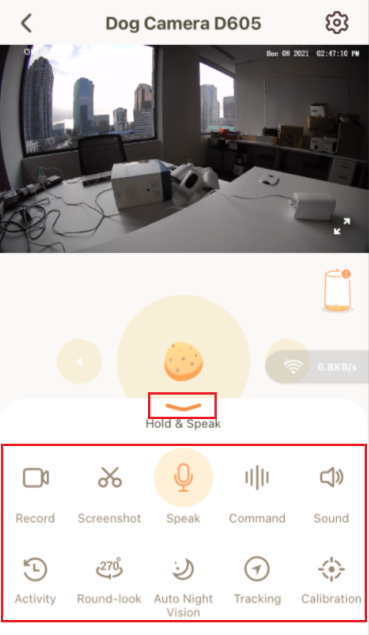
Additionally, you can also tap on the arrow shown in the image below to quickly access the following camera features on the live view screen.
- Record: manually record a video and it will automatically save to the photo album on the phone.
- Screenshot: manually take a screenshot and it will automatically save to the photo album on the phone.
- Speak: speak to your pet via the camera’s 2-way audio.
- Command: play pre-recorded pet commands for your pets to listen to.
- Sound: enable or disable sound.
- Activity: check the activity history.
- Round-look: rotate the camera around 270°.
- Auto Night Vision: enable or disable night vision on the camera.
- Tracking: enable or disable the camera’s ability to track.
- Calibration: automatically calibrate the camera.
Note: The live view screen also allows you to toss treats to your dog. Please visit How to Toss Dog Treats by Using the eufy Pet App for detailed instructions.
If you have further questions regarding how to play eufy Pet Camera live view in the eufy Pet app, please contact us for assistance.

How to Play eufy Pet Camera Live View in the eufy Pet App
Download
Applicable for those products :

Resolved

Unresolved
Copied
0 Results
Manuals & Downloads
EU Declaration of Conformity for soundcore A3i_A3992
Download
A3961 QSG V2(1)
Download
UK&CA Declaration of Conformity for soundcore Liberty 4_A3953
Download
EU Declaration of Conformity for soundcore Liberty 4_A3953
Download
A3947_Liberty 4 NC_QSG
Download
Liberty 4_A3953_QSG
Download
Q20i_QSG
Download
A6610_soundcore_Sleep_A10_QSG
Download
EU&UK Declaration of Conformity for soundcore Sleep A10_A6610
Download
A3947_Liberty 4 NC_User Manual
Download
Support Videos


