How to Pair Your Liberty 4 NC Earbuds with a Samsung Galaxy S23
Additional tips on pairing your Liberty 4 NC earbuds with a Samsung Galaxy S23 series mobile phone.
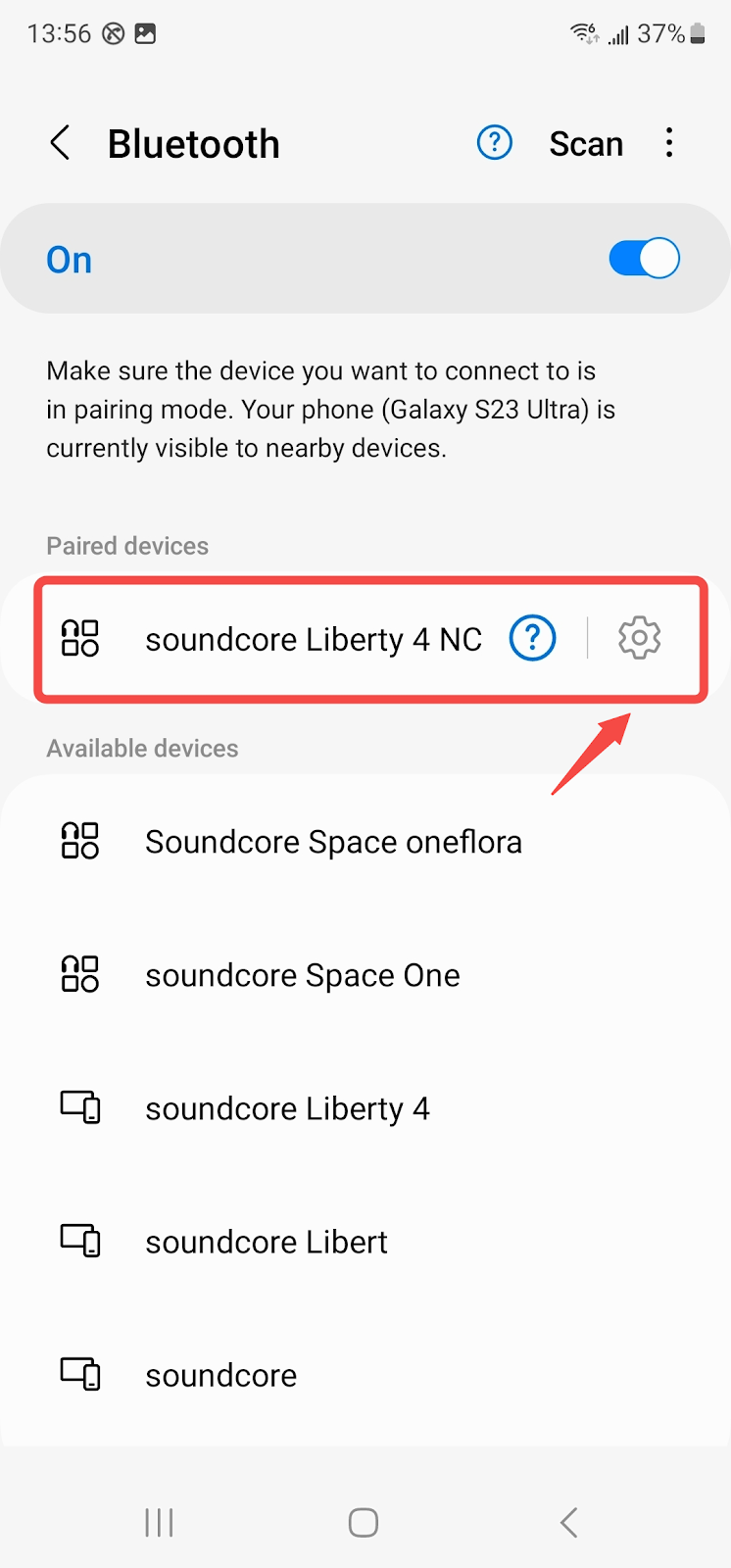
1. Open your phone and go to > Settings > Bluetooth
2. Find soundcore Liberty 4 NC, and press the gear icon on the right:
3. Turn on " Calls" and "Audio", and turn off "LE Audio":
4. Go back to Bluetooth, and reconnect Liberty 4 NC:
5. After connecting, update the earbuds' firmware to the latest version (V3.73 or above)
If you have any more issues or your issue has not been resolved, please contact soundcore customer support for further assistance.

30 undefined
How to Reset Your soundcore Headphones 59082 views 5 likes/2025-04-08 16:03:59
Guide to Locating the Serial Number (SN) of Your soundcore Headphones 58367 views 6 likes/2024-08-16 18:04:10
Parts and Accessories of soundcore Headphones 14319 views 1 likes/2025-04-08 16:02:25
soundcore Liberty 4 NC Follow Up Tips 22724 views 29 likes/2025-04-08 16:02:15
How to Identify Genuine soundcore Products 22481 views 2 likes/2025-04-08 16:02:15
How to Fix Liberty 4 NC Earbuds Pairing Issues 13410 views 1 likes/2025-04-08 16:02:13
Additional Tips on Pairing Liberty 4 NC Earbuds with Windows 11 System PC 11455 views 1 likes/2025-04-08 16:02:15
How to Set the Audio Input and Output on a Windows computer 13064 views 3 likes/2025-04-08 16:02:14
How to Reset soundcore Liberty 4 NC 11320 views 3 likes/2025-04-08 16:02:12
How to Fix the Disconnecting and Sound Interrupted Issues 13148 views 1 likes/2025-04-08 16:02:13

A3943C_soundcore_Life_Note_C_Manual

A3943 Life Note C User Manual

EU_Declaration_of_Conformity_for_soundcore_Note_E_A3943

A3943 Life Note E DOC

Life Note E User Manual

A3944C_soundcore_Life_P2_Mini_Manual
View More


How to Clean Your Headphones


How to Clean Your Headphones


How to Wear Life P2 Mini Correctly


How to Reset Life P2 Mini


How to Power Life P2 Mini On/Off and Use Touch Control


How to Pair Life P2 Mini
View More
