The earbuds default to "Automatic Switching." If you prefer Manual Switching, you can change this in the app.
To do so, go to: Open App > More Settings > Multi-Device Connection > Multi-Device Playback > Select "Manual Switching."
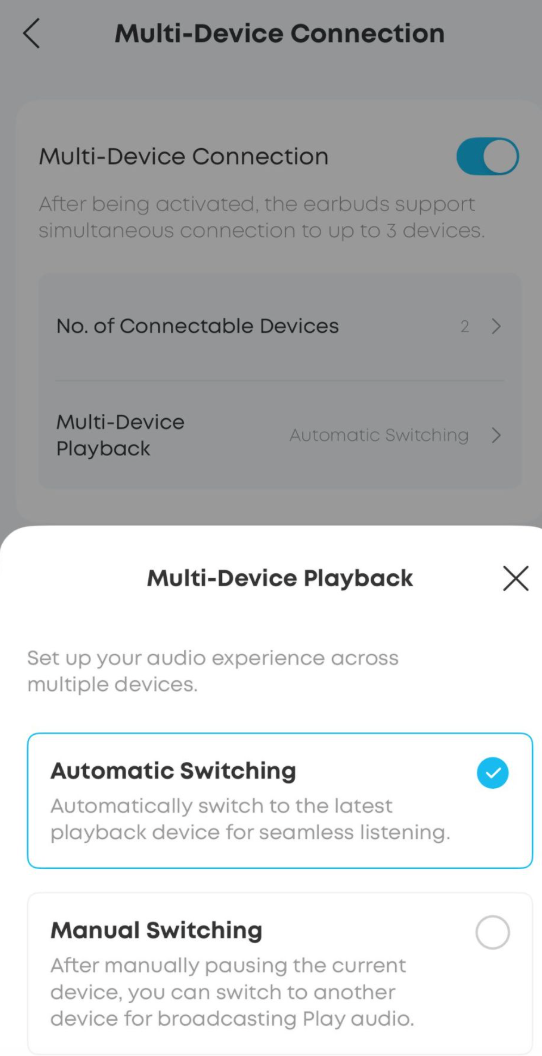
Differences between Automatic Switching and Manual Switching:
Automatic Switching: The earbuds automatically switch to whichever connected device most recently started audio playback.
Drawback: Audio may be interrupted during listening. For example, a notification sound from another device may be treated as audio playback, causing the earbuds to switch unexpectedly.
Manual Switching: The earbuds will not switch automatically between devices. You need to pause audio on the current device before switching to another.
Note: When there is an incoming call on any connected device, the earbuds will always switch to the call automatically, regardless of whether Automatic or Manual Switching is activated.
If you encounter any other issues or your issue has not been resolved, please contact us for further assistance.